| Business Type: |
Sell Product |
| Target Client: |
Worldwide Buyers |
| Heading: |
Wireless Pen Mouse |
| Description: |
Wireless Pen type Optical Mouse
(i-PEN Pro)
1. WHAT is Wireless Pen-type Mouse
"Digital Pen-type Input device¡°For Next Generation
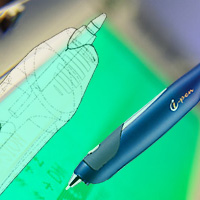
i-PenTM is a ¡°Wireless Pen-type Optical Mouse¡±, a wireless input device for computers and IT terminals.
What would happen when a traditional pen combines with advanced optical technologies? You get a very unique input device that is truly made for everyday life. i-pen is an input and writing device that looks and feels like a natural pen. Unlike the stylus pen for PDA or tablet, however, i-pen can be freely used on any surfaces (Except on the glass or shiny white paper any surface).
With i-pen you can do more work in natural manner, such as free handwriting, which was previously impossible with conventional input device.
2. PRODUCT CONCEPT
Point, click, like a mouse
i-pen Mouse is a pen-shaped mouse for PC that allows natural writing just like
Using a real pen. Utilizing the latest optical navigation technology, i-pen is lightweight,
Durable, and accurate. With i-pen Mouse, user can perform natural handwriting
to do more creative work or special task that was previously impossible with mouse.
Write and draw, just like a pen.
i-pen Mouse is designed to work in "mouse mode" for fast point-and-click action and
also in "pen mode" for writing and drawing actions.
Two modes can be changed manually with switch of the button. Especially,
because it requires very small surface to write on, it is very ideal for notebook users
and perfect for places with limited workspace is allowed.
3. FEATURES
Ergonomic, Digital, Wireless, Pen-type, Optical Input Device for your PC
Optical navigation technology: Accurate, no moving parts and superior performance
Changes between "Pen mode" and "Mouse mode" by switch button
Compact and light: Perfect for notebook users
Ergonomic design: Fits comfortably on your hand
Standard mouse driver and USB connection just plug and play
No special pad is required: Free to use on any surface
Included various software to enhance user¡¯s productivity.
- Web-Memo for writing instant notes on top of web-pages
- OCR program for understanding any languages (Chinese, Korean and English).
Wireless version of i-pen Mouse with radio frequency (RF) technology will be available.
Pen tip able to be replaced if it has been used for long period of time.
Battery check icon, created on system tray on PC, indicates current battery condition
Radio standard certificate : 2.4GHz to use, from the whole world use possibility
System Requirements
i-Pen Pro requires the following minimum system configuration.
- At least Pentium II 400 MHz or equivalent.
- OS: Windows 98/ME/2000/XP
- Available USB port for PC or notebook.
PC or PDA without USB port will not be usable.
4. USER BENEFIT
4.1) Freehand Writing & Signature
i-pen Mouse works in "mouse mode" for fast point-and-click action.
For writing and drawing, with a click of a button i-pen Mouse changes to "pen mode".
While i-pen is in writing mode, user can write a comment, trace a image on magazine,
or sign a signature: user can do works that were not possible with mouse.
People who are not accustomed to using tablet or stylus can easily adopt to use i-pen to write complex symbols and diagrams.
4.2) Ergonomic pen design
All i-pen series are designed carefully, in order to achieve comfortable feeling like a real
pen. For graphic designers and people who work long hours on computers,
a pen-shaped input device puts less strain on hands than mouse does.
With the picture together while using (picture which it is using with pen mouth) the hand of the user will be able to maintain a neutral location (Neutral Position) it is and eight suddenly is twisted with the wrist kkek the actual condition of the back which is does not occur not to be, it is natural and to side overlook it will be able to use
4.3) OCR (Optical character recognition)]
Function
1) Windows XP or above version:
Users are able to use its OCR programs to convert users own handwriting to text or save handwriting as a picture file. For that environment that supports OCR programs, IME pad is located on task bar and able to launch this function by clicking the icon (IME Pad).
** (Handwritten to text conversion will not be supported if OCR isn¡¯t Windows XP or above isn¡¯t installed.)
2) rite PenTM, rite MailTM : ( Freeware;
Users are able to convert users own handwriting to text with
ritePen TM, riteMailTM as shown in pictures.
3) Office XP or above version
Users are able to convert users own handwriting to text with
Office XP or above version as shown in pictures.
Also Users
5. USER SCENARIO
5.1) Presentations and Lectures
Also, while you are doing a presentation with Microsoft PowerPoint¢â you can write your comment on the fly and grab the attention of audience.
Because i-pen requires very small work area, for business people who have to deliver presentation at a small podium it is a great presentation tool.
For teachers and lecturers it is a perfect replacement to overhead projector with foils.
Combining projector, i-pen and presentation software is the best way to interact with audience and keeping them well directed. Freehand Writing
5.2) Writing on Web pages
i-pen Mouse comes with Finger White, Web-Memo or Microsoft OneNote, software that let you write a note, even, on top of web pages. When the site is revisited, the note will show on screen again.
For web developers or Web Designers, it is great way to communicate your ideas and review the design.
5.3) Special Characters & Diagram
Our written languages and symbols greatly exceed the capability of keyboard or mouse.
i-pen Mouse has great advantages over keyboard and mouse when it comes to special
character such as mathematics or scientific symbols and foreign languages.
Especially, for Asian languages, writing with i-pen Mouse will greatly increase the speed
and information accessibility compared with typing characters
5.4) For Kids and Education
With all Graphic software, such as Corel Painter, Photoshop, Paint-shop and so on.
i-pen Mouse is a great instrument for Kids when they first learn the computer.
Instead of mouse, let them use i-pen Mouse with drawing programs.
Kids will experience computer with i-pen to show up hidden creative talent.
5.5) ISV Multi-User Access System for Lectures and Meetings
ISV ¡°Multi-user Access Wireless Pen-mouse System¡± allows Lecturer () and Listener able to participate the Lecture (Presentation) together using Wireless Pen Mouse, (hand free writing, marking, drawing diagram), onto the Large Screen Monitor display.
l Requested User can be chosen and be controlled by the Lecturer
l More than 100 Users can be covered ( for Large-scale Lecture room or conference room )
l Lecturer or Speaker can do proceed with the lecture or with the program from his seat
l Listener able to communicate trough writing his/her comments or drawing diagrams on Screen
6. MARKET APPLICATIONS
Potential Business Field
Web design and Web development
News paper, Magazine and Desktop Publishing
e-Learning and Computer based Training (CBT)
Bank/Security
Internet appliances and Kiosks
Presentation equipments
Medical Information equipments
Mobile Handsets and Mobile IT Terminals
PDA, Notebook PCs, Hand-held PCs¡¦
7. TECHNICAL DATA
ITEM DESCRIPTION
Product Category: Wireless Pen type Mouse
Communication: Wireless Type / Use RF (2.4GHz) communication
Distance : Max:30m , Inside : 10m
Time: 6 hour (continuous usage time) / 72 hour (standby)
Connection: Pen stand Combination (Receiver connected USB port)
Resolution : 800 dpi
Operational environment : Windows 98/ME/2000/XP and Mac OS 9.x over
The Pentium the CPU and USB pot support above class the PCThe USB support the PDA , the Mac(Standard mouth operation)
Uses with the aspect driver together,the pen function use possibility
Dimensions: 157mm(L) x 18mm(W) x 30mm(H)
Power: 3.7 V rechargeable Battery
Pen tip : Plastic tip
Weight : 40g (with battery)
Web MemoTM : Used with a web browse Memo application
Finger WhiteTM : Window where it stands but memoing it was possibleMemo application
|
| Quantity: |
10pcs |
| Payment Terms: |
T/T |
| Product Origin: |
KOREA |
| Port of Delivery: |
INCHEON |
|
|
|
